Data security has become a basic need in every organization or company. Generally, to support their businesses,organizations or companies need a mean of communication between the branch offices so that intranet is needed. Basically, intranet is a local network and internet is an open network and has not a security mechanism on its protocol (TCP/IP). A security mechanism which guarantees command integrity and authenticity is needed. The selected message security mechanism which uses the cryptography technique using SHA-512 is implemented to guarantee data integrity and authenticity.
MD5 encryption method
MD5 is one of a series of message digest algorithms designed by Professor Ronald Rivest of MIT (Rivest, 1994). When analytic work indicated that MD5's predecessor MD4 is to be insecure, MD5 was designed in 1991 as the successor of MD4 (MD4 weaknesses found by Hans Dobbertin). In cryptography, MD5 (Message-Digest algortihm 5) is a cryptographic hash function is used extensively with 128-bit hash value.
On the Internet standard (RFC 1321), MD5 has been utilized in a variety of security applications, and MD5 are also commonly used for testing the integrity of a file.
SHA is a set of cryptographic hash functions designed by the National Security Agency (NSA) and published by NIST as a U.S. Federal Information Processing Standard.
SHA is the Secure Hash Algorithm. The types of the SHA SHA-0, SHA-1, and SHA-2.
For SHA-2 algorithms are identical to the summary measure of well-known variables as SHA-224, SHA-256, SHA-384, and SHA-512.
Peter Selinger has made a demonstration of two different pieces of executable files but have the same MD5 hash value. The scenario is of two files one is the original file, another is a bad file. Both have the size and the same MD5 hash value.
This will trick the similarity hash Tripwire and the people who download files from the internet. Tripwire will silence even though the file has been modified executables attacker. So wheb the man who download an executable file from the internet
it turns out that he had received file has been changed mid-way.
However, because after the calculated value hash matches with the original file, the victim will think that's true and original file but different.
Why SHA512 is a superior hashing algorithm to MD5.
It depends on your use case. But there are areas where MD5 has been broken:
1. For starters: MD5 is old, and common. There are tons of rainbow tables against it, and they're easy to find. So if you're hashing passwords (without a salt - shame on you!) - using md5 - you might as well not be hashing them, they're so easy to find. Even if you're hashing with simple salts really.
2. Second off, MD5 is no longer secure as a cryptographic hash function (indeed it is not even considered a cryptographic hash function anymore as the Forked One points out). You can generate different messages that hash to the same value. So if you've got a SSL Certificate with a MD5 hash on it, I can generate a duplicate Certificate that says what I want, that produces the same hash. This is generally what people mean when they say MD5 is 'broken' - things like this.
3. Thirdly, similar to messages, you can also generate different files that hash to the same value so using MD5 as a file checksum is 'broken'.
Algorithm SHA-512 hash functions including the type of which is the development of the algorithm SHA-1. hash function
map the message regardless of length M with a hash value of fixed length h (particular, depending
the algorithm). For the algorithm SHA-512 hash value of the resulting length is 512 bits. Hash function that
produces output with its small size vulnerable to attact birthday [4]. This attack was carried out with
how to get two random messages that have the same hash value h.
SHA-512 as the hash function has properties as follows:
(1). h is easily calculated when given M.This trait is a must, because if h is difficult calculated, then the hash function can not be used.
(2). M can not be counted if it is only known to h.This trait is also called one-way function, or easy to calculate h and difficult to be returned to the M
original. These properties are important in cryptographic techniques, as if without this trait then the attacker can find the value of M by knowing its hash value h.
(3). It is impossible sought M and M 'such that H (M) = H (M').This trait is also called collision free. These properties prevent the possibility of forgery.
Wednesday, March 7, 2012
Tuesday, March 6, 2012
Setting Database Sybase Anywhere
Here is an explanation for setting up databases Sybase Anywhere on the Server side and Client on windows XP or 7
Server side
Go to control panel then odbc menu and do like the picture below, don't forget you must set path to the DBSERV#.exe, ADD ODBC for Adaptive Server Anywhere, and many library of database Anywhere. You must define login and password for database in login tab
Client side
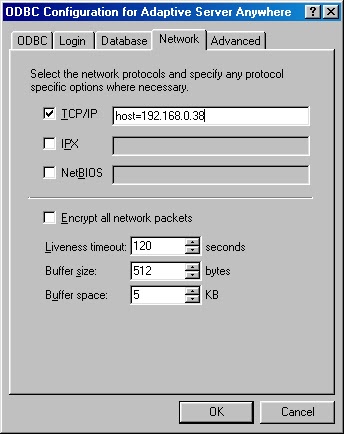
Go to control panel then odbc menu ADD ODBC for Adaptive Server Anywhere and do like the picture below, set the IP server on client set. Yau must define login and password for database in login tab
Server side
Go to control panel then odbc menu and do like the picture below, don't forget you must set path to the DBSERV#.exe, ADD ODBC for Adaptive Server Anywhere, and many library of database Anywhere. You must define login and password for database in login tab
Client side
Go to control panel then odbc menu ADD ODBC for Adaptive Server Anywhere and do like the picture below, set the IP server on client set. Yau must define login and password for database in login tab
Friday, October 14, 2011
Creating and configuring a MySQL DataSource in GlassFish Application Server.
Follow the below steps for creating and configuring a MySQL DataSource in GlassFish application server.
1. Download MySQL JDBC driver from http://dev.mysql.com/downloads/connector/j/3.1.html
2. Extract the contents of the zip file
3. Copy mysql-connector-java-x.x.x-bin.jar to GLASS_FISH_INSTALL_DIR\lib folder.
3. Start your GlassFish Application server by issuing the command ‘asadmin.bat start-domain domain1′ from GLASS_FISH_INSTALL_DIR\bin directory.
4. Login to GlassFish admin console. The default url for GlassFish admin console will be http://localhost:4848/login.jsf. The default username and password for accessing the admin console will be admin and adminadmin respectively.
5. From Common Task menu expand Resources menu by clicking on Resources menu.
6. Expand JDBC under resources.
7. Click on ‘Connection Pools’ under JDBC menu. The Connection Pools page will be displayed.

8. Click on New.
9. Enter a name for your JDBC Connection pool. Select javax.sql.ConnectionPoolDataSource as your ‘Resource Type’ and select MySQL as your ‘Database vendor’.

10. Click on Next.
11. Fill the details according to your need. Minimum you need to fill the following fields.
a. DatabaseName
b. Password
c. URL (The format will be jdbc:mysql://localhost:3306/test. Where test is your database name.)
d. Url (The format will be jdbc:mysql://localhost:3306/test. Where test is your database name.)
e. ServerName
f. User
12. Click on Finish. You will be taken back to the Connection Pools page.
13. Click on the Connection Pool you created. You will be taken to ‘Edit Connection Pool’ page.
14. Click on Ping. If your connection pool is setup correctly you will get a Ping Succeeded message.

15. Now click on JDBC Resorces under JDBC menu.
16. Click on New.
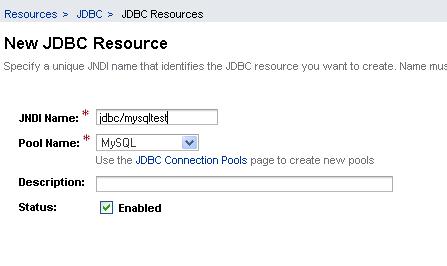
17. Enter a JNDI Name for your data source. Select the pool you created by following the above steps as your ‘Pool Name’.

18. Click on OK. You are done.To obtain a connection using the above DataSource, use the following code.
Source: http://www.albeesonline.com
http://www.albeesonline.com/blog/2008/08/06/creating-and-configuring-a-mysql-datasource-in-glassfish-application-server/
Follow the below steps for creating and configuring a MySQL DataSource in GlassFish application server.
1. Download MySQL JDBC driver from http://dev.mysql.com/downloads/connector/j/3.1.html
2. Extract the contents of the zip file
3. Copy mysql-connector-java-x.x.x-bin.jar to GLASS_FISH_INSTALL_DIR\lib folder.
3. Start your GlassFish Application server by issuing the command ‘asadmin.bat start-domain domain1′ from GLASS_FISH_INSTALL_DIR\bin directory.
4. Login to GlassFish admin console. The default url for GlassFish admin console will be http://localhost:4848/login.jsf. The default username and password for accessing the admin console will be admin and adminadmin respectively.
5. From Common Task menu expand Resources menu by clicking on Resources menu.
6. Expand JDBC under resources.
7. Click on ‘Connection Pools’ under JDBC menu. The Connection Pools page will be displayed.

8. Click on New.
9. Enter a name for your JDBC Connection pool. Select javax.sql.ConnectionPoolDataSource as your ‘Resource Type’ and select MySQL as your ‘Database vendor’.

10. Click on Next.
11. Fill the details according to your need. Minimum you need to fill the following fields.
a. DatabaseName
b. Password
c. URL (The format will be jdbc:mysql://localhost:3306/test. Where test is your database name.)
d. Url (The format will be jdbc:mysql://localhost:3306/test. Where test is your database name.)
e. ServerName
f. User
12. Click on Finish. You will be taken back to the Connection Pools page.
13. Click on the Connection Pool you created. You will be taken to ‘Edit Connection Pool’ page.
14. Click on Ping. If your connection pool is setup correctly you will get a Ping Succeeded message.

15. Now click on JDBC Resorces under JDBC menu.
16. Click on New.
17. Enter a JNDI Name for your data source. Select the pool you created by following the above steps as your ‘Pool Name’.

18. Click on OK. You are done.To obtain a connection using the above DataSource, use the following code.
Source: http://www.albeesonline.com
http://www.albeesonline.com/blog/2008/08/06/creating-and-configuring-a-mysql-datasource-in-glassfish-application-server/
Subscribe to:
Posts (Atom)